|
|
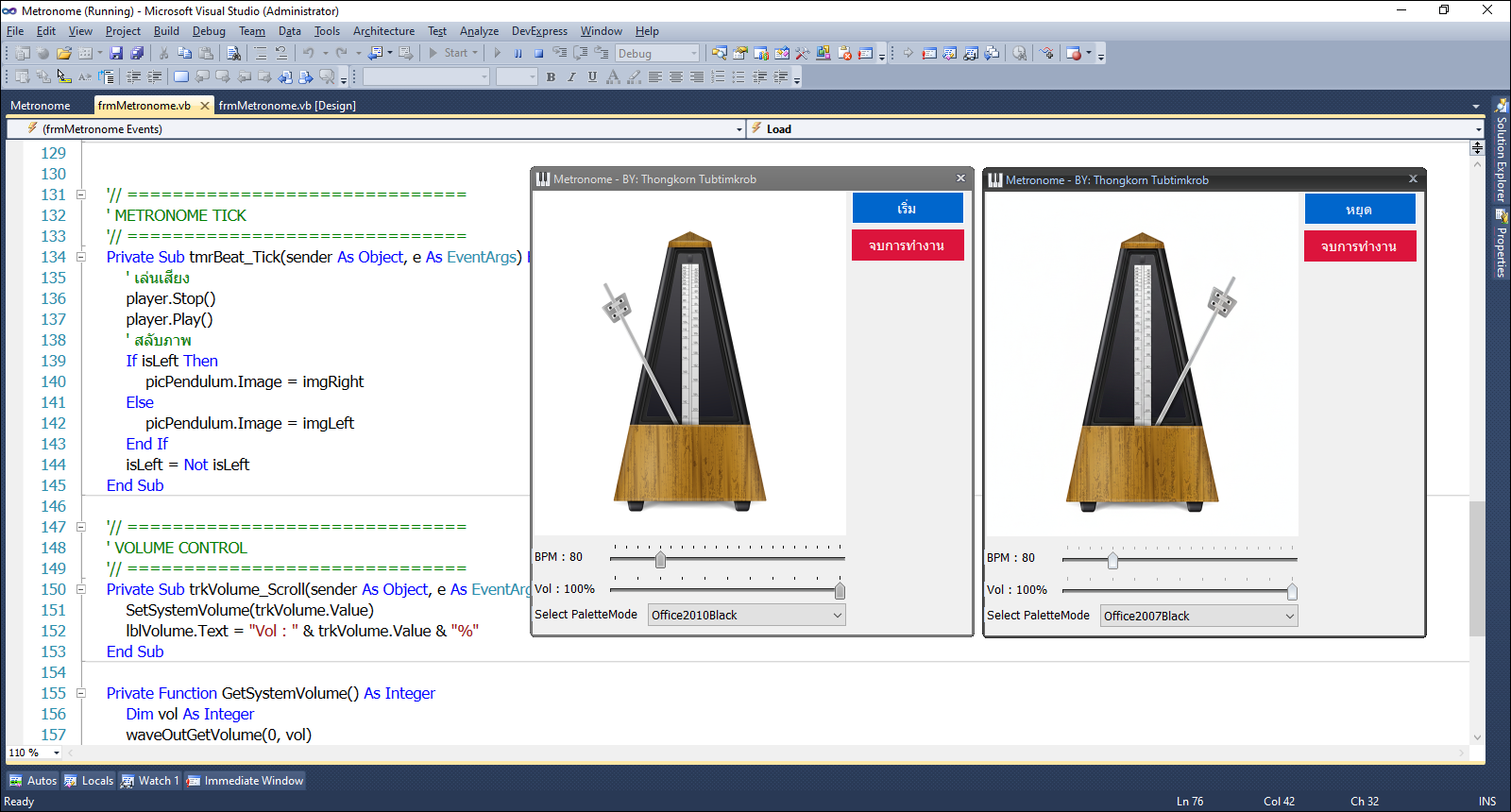
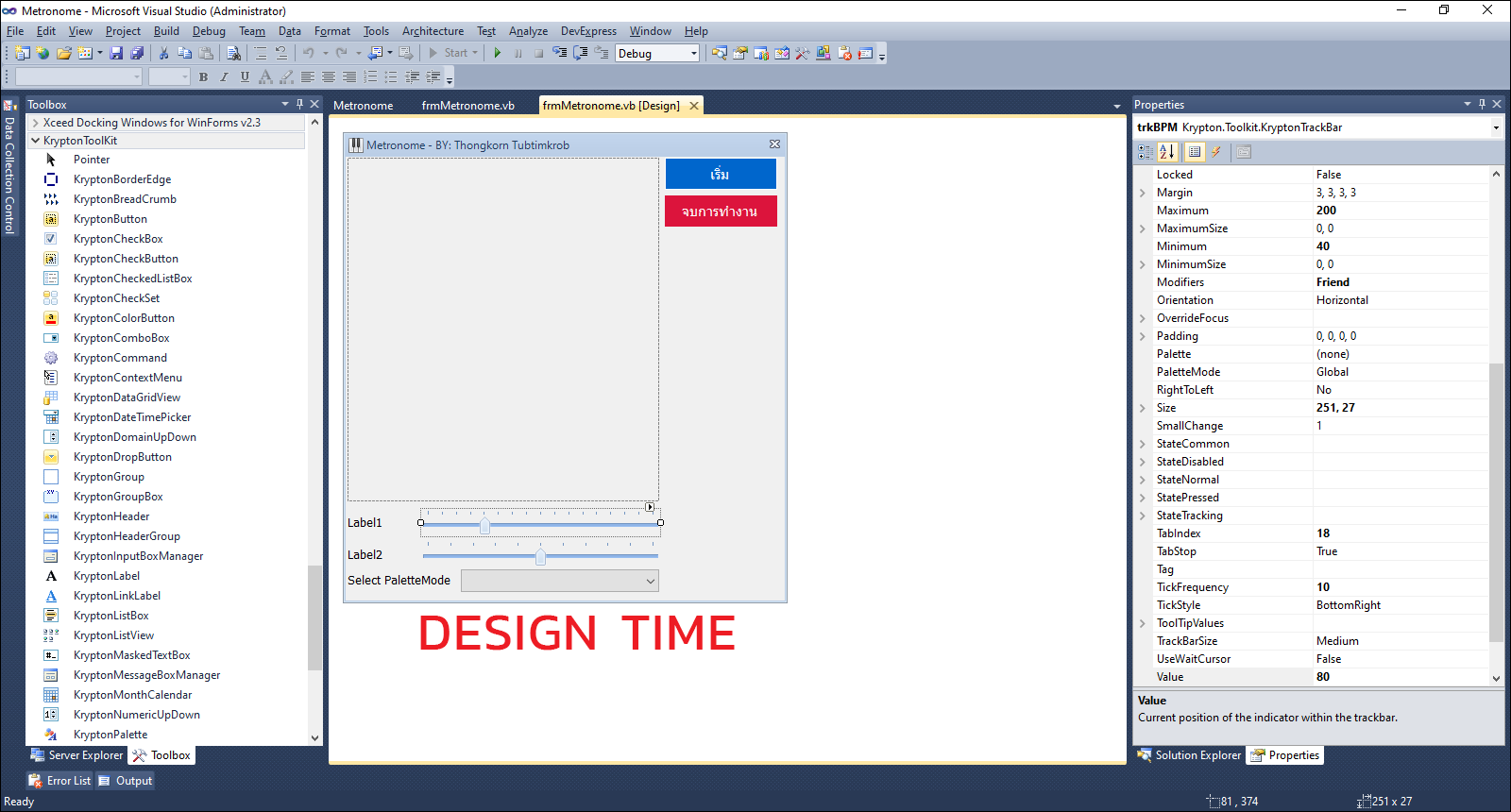
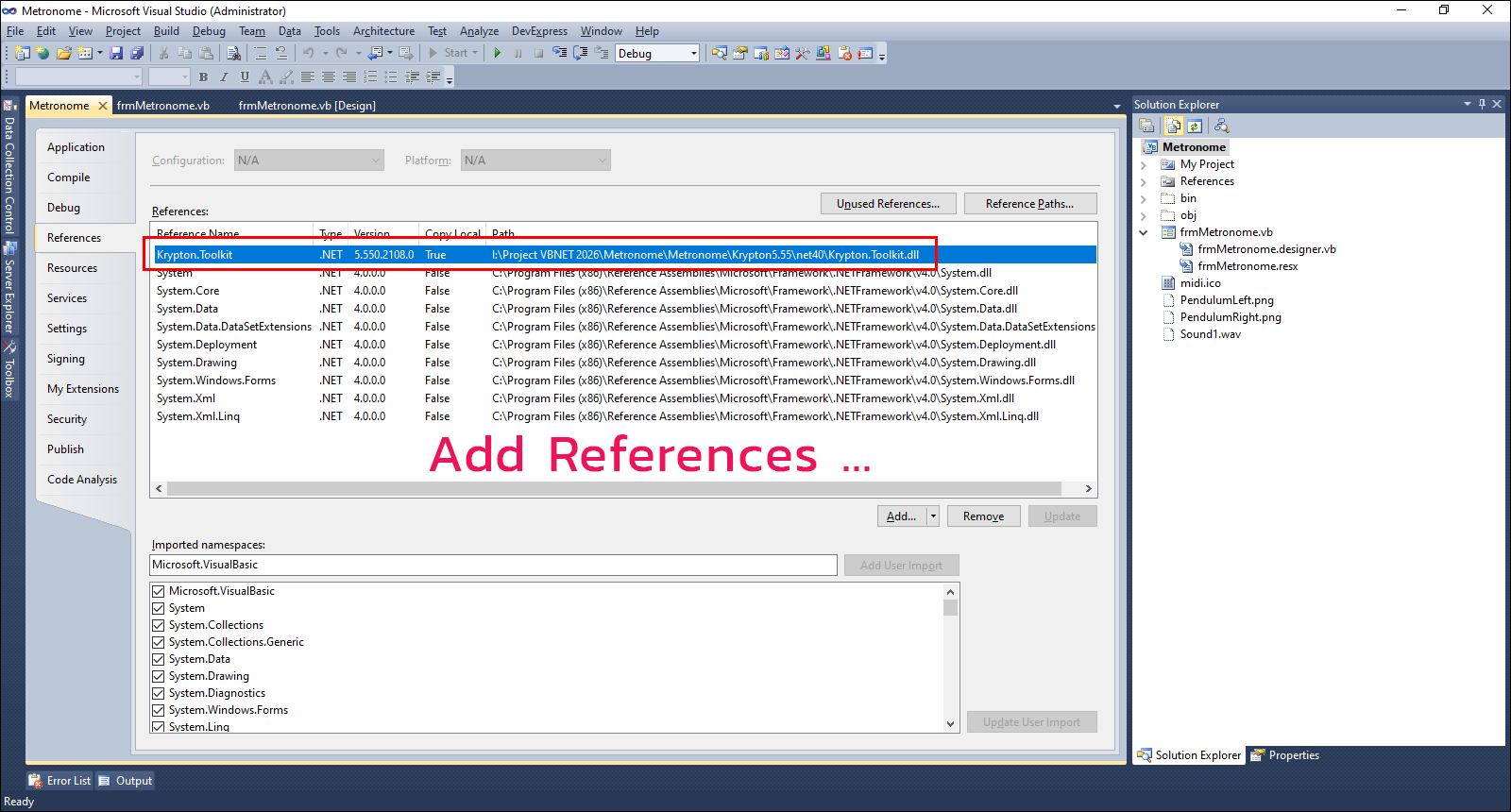
Add References ... KryptonToolkit ...
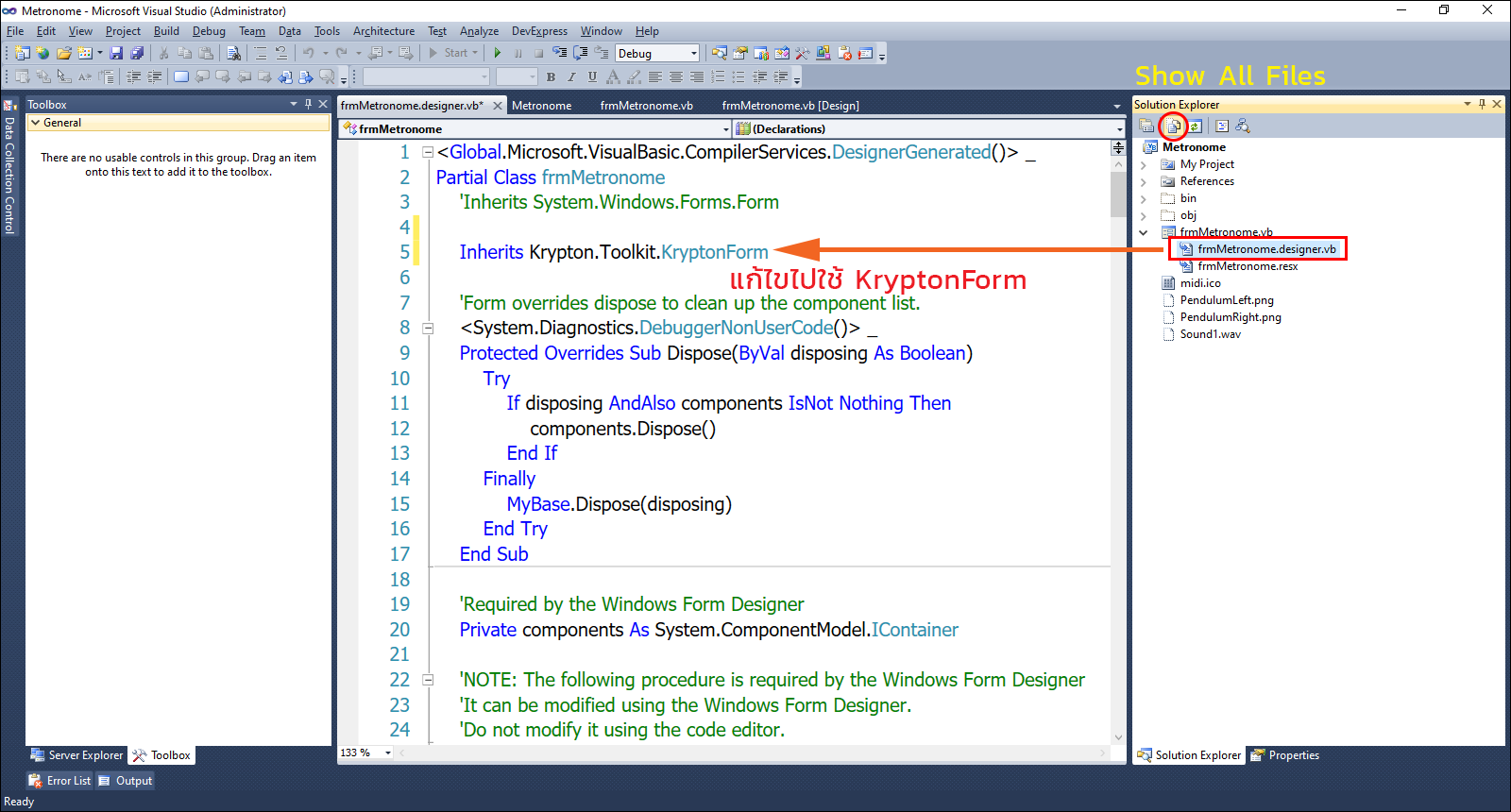
การเปลี่ยน Skin หรือ Theme ของ KryptonToolkit 5.55 สำหรับ .Net Framework 4.0
Metronome (เมโทรนอม) คืออุปกรณ์ที่ใช้กำหนดจังหวะ (Tempo) ในดนตรี โดยจะส่งเสียง "ติ๊ก-ต็อก" หรือเสียงเคาะออกมาเป็นช่วงเวลาที่สม่ำเสมอ เพื่อให้นักดนตรีเล่นตามจังหวะได้ตรงกัน
หน้าที่หลักของ Metronome
- ช่วยควบคุมความเร็วของเพลง (เช่น 60, 80, 120 BPM)
- ฝึกการรักษาจังหวะให้สม่ำเสมอ
- ใช้ซ้อมดนตรีเดี่ยวหรือทั้งวง
BPM (Beats Per Minute) คือจำนวนครั้งของจังหวะใน 1 นาที
60 BPM = 1 จังหวะต่อวินาที
120 BPM = 2 จังหวะต่อวินาที
4/4 คือ เครื่องหมายกำหนดจังหวะ (Time Signature) ที่ใช้บอกโครงสร้างของจังหวะในเพลง
ความหมายของ 4/4
ตัวเลขบน (4) = มี 4 จังหวะ ใน 1 ห้องเพลง (1 Bar)
ตัวเลขล่าง (4) = หนึ่งจังหวะมีค่าเป็น โน้ตตัวดำ (Quarter Note)
ดังนั้น 4/4 = 1 ห้องมี 4 จังหวะ และแต่ละจังหวะเท่ากับโน้ตตัวดำ 1 ตัว
มาดูโค้ดต้นฉบับเต็มกันเถอะ ...
- Imports System.Media
- Imports Krypton.Toolkit
- Public Class frmMetronome
- '// ==============================
- ' API สำหรับควบคุมเสียง Windows
- '// ==============================
- Private Declare Function waveOutGetVolume Lib "winmm.dll" _
- (ByVal uDeviceID As Integer, ByRef lpdwVolume As Integer) As Integer
- Private Declare Function waveOutSetVolume Lib "winmm.dll" _
- (ByVal uDeviceID As Integer, ByVal dwVolume As Integer) As Integer
- '// ==============================
- ' ตัวแปรหลักของโปรแกรม
- '// ==============================
- Private player As SoundPlayer
- Private isLeft As Boolean = True
- Private isRunning As Boolean = False
- Private imgLeft As Image
- Private imgRight As Image
- Private WithEvents tmrBeat As New Timer
- Private Sub frmMetronome_FormClosed(sender As Object, e As System.Windows.Forms.FormClosedEventArgs) Handles Me.FormClosed
- Me.Dispose()
- GC.SuppressFinalize(Me)
- Application.Exit()
- End Sub
- '// ==============================
- ' FORM LOAD
- '// ==============================
- Private Sub frmMetronome_Load(sender As Object, e As EventArgs) Handles MyBase.Load
- ' ค่า BPM เริ่มต้น
- With trkBPM
- .Minimum = 40
- .Maximum = 240
- .Value = 80
- .BackStyle = Krypton.Toolkit.PaletteBackStyle.ButtonForm
- .TickFrequency = 10
- End With
- trkBPM.Value = 80
- lblBPM.Text = "BPM : 80"
- Call SetTimerInterval()
- ' โหลดเสียง
- Dim soundPath As String = MyPath(Application.StartupPath) & "Sound1.wav"
- player = New SoundPlayer(soundPath)
- ' โหลดรูปครั้งเดียว
- imgLeft = Image.FromFile(MyPath(Application.StartupPath) & "PendulumLeft.png")
- imgRight = Image.FromFile(MyPath(Application.StartupPath) & "PendulumRight.png")
- picPendulum.Image = imgLeft
- ' ตั้งค่า Volume จากระบบ
- With trkVolume
- .Minimum = 0
- .Maximum = 100
- .Value = 50
- .BackStyle = Krypton.Toolkit.PaletteBackStyle.ButtonForm
- .TickFrequency = 10
- End With
- trkVolume.Value = GetSystemVolume()
- lblVolume.Text = "Vol : " & trkVolume.Value & "%"
- btnStart.Text = "เริ่ม"
- '// KryptonToolkit Palette.
- With cmbPalette
- .Items.Add("Office2003")
- .Items.Add("Office2007Blue")
- .Items.Add("Office2007Silver")
- .Items.Add("Office2007Black")
- .Items.Add("Office2010Blue")
- .Items.Add("Office2010Silver")
- .Items.Add("Office2010Black")
- End With
- cmbPalette.SelectedIndex = 4
- '// Set to KryptonDataGridView By changing the Palette according to the main form.
- Me.PaletteMode = Krypton.Toolkit.PaletteMode.Global
- End Sub
- '// ==============================
- ' BPM CONTROL
- '// ==============================
- Private Sub trkBPM_Scroll(sender As Object, e As EventArgs) Handles trkBPM.Scroll
- lblBPM.Text = "BPM : " & trkBPM.Value
- SetTimerInterval()
- End Sub
- Private Sub SetTimerInterval()
- tmrBeat.Interval = CInt(60000 / trkBPM.Value)
- End Sub
- '// ==============================
- ' START / STOP (Toggle)
- '// ==============================
- Private Sub btnStart_Click(sender As Object, e As EventArgs) Handles btnStart.Click
- If Not isRunning Then
- tmrBeat.Start()
- btnStart.Text = "หยุด"
- isRunning = True
- Else
- tmrBeat.Stop()
- btnStart.Text = "เริ่ม"
- picPendulum.Image = imgLeft
- isRunning = False
- End If
- End Sub
- Private Sub btnExit_Click(sender As Object, e As EventArgs) Handles btnExit.Click
- Me.Close()
- End Sub
- '// ==============================
- ' METRONOME TICK
- '// ==============================
- Private Sub tmrBeat_Tick(sender As Object, e As EventArgs) Handles tmrBeat.Tick
- ' เล่นเสียง
- player.Stop()
- player.Play()
- ' สลับภาพ
- If isLeft Then
- picPendulum.Image = imgRight
- Else
- picPendulum.Image = imgLeft
- End If
- isLeft = Not isLeft
- End Sub
- '// ==============================
- ' VOLUME CONTROL
- '// ==============================
- Private Sub trkVolume_Scroll(sender As Object, e As EventArgs) Handles trkVolume.Scroll
- SetSystemVolume(trkVolume.Value)
- lblVolume.Text = "Vol : " & trkVolume.Value & "%"
- End Sub
- Private Function GetSystemVolume() As Integer
- Dim vol As Integer
- waveOutGetVolume(0, vol)
- Dim leftVol As Integer = vol And &HFFFF
- Return CInt((leftVol / &HFFFF) * 100)
- End Function
- Private Sub SetSystemVolume(ByVal level As Integer)
- If level < 0 Then level = 0
- If level > 100 Then level = 100
- Dim newVol As Integer = CInt((level / 100.0) * &HFFFF)
- Dim volAll As Integer = (newVol << 16) Or newVol
- waveOutSetVolume(0, volAll)
- End Sub
- ' / --------------------------------------------------------------------------------------------
- ' / Change Palette Mode.
- ' / --------------------------------------------------------------------------------------------
- Private Sub cmbPalette_SelectedIndexChanged(sender As System.Object, e As System.EventArgs) Handles cmbPalette.SelectedIndexChanged
- Dim manager As New KryptonManager()
- Select Case cmbPalette.SelectedIndex
- Case 0
- manager.GlobalPaletteMode = PaletteModeManager.ProfessionalOffice2003
- Case 1
- manager.GlobalPaletteMode = PaletteModeManager.Office2007Blue
- Case 2
- manager.GlobalPaletteMode = PaletteModeManager.Office2007Silver
- Case 3
- manager.GlobalPaletteMode = PaletteModeManager.Office2007Black
- Case 4
- manager.GlobalPaletteMode = PaletteModeManager.Office2010Blue
- Case 5
- manager.GlobalPaletteMode = PaletteModeManager.Office2010Silver
- Case 6
- manager.GlobalPaletteMode = PaletteModeManager.Office2010Black
- End Select
- End Sub
- #Region "UTILITY"
- Private Function MyPath(ByVal AppPath As String) As String
- Dim p = AppPath.ToLower().
- Replace("\bin\debug", "").
- Replace("\bin\release", "").
- Replace("\bin\x86\debug", "").
- Replace("\bin\x86\release", "")
- If Not p.EndsWith("") Then p &= ""
- Return p
- End Function
- #End Region
- End Class
ดาวน์โหลดโค้ดต้นฉบับ VB.NET (2010) ได้ที่นี่ ...
ดาวน์โหลด krypton Toolkit 5.55 สำหรับ .Net Framework 4.0 ได้ที่นี่ ...
|
ขออภัย! โพสต์นี้มีไฟล์แนบหรือรูปภาพที่ไม่ได้รับอนุญาตให้คุณเข้าถึง
คุณจำเป็นต้อง ลงชื่อเข้าใช้ เพื่อดาวน์โหลดหรือดูไฟล์แนบนี้ คุณยังไม่มีบัญชีใช่ไหม? ลงทะเบียน
x
|




 โพสต์ 2026-2-11 12:59:18

