|
|
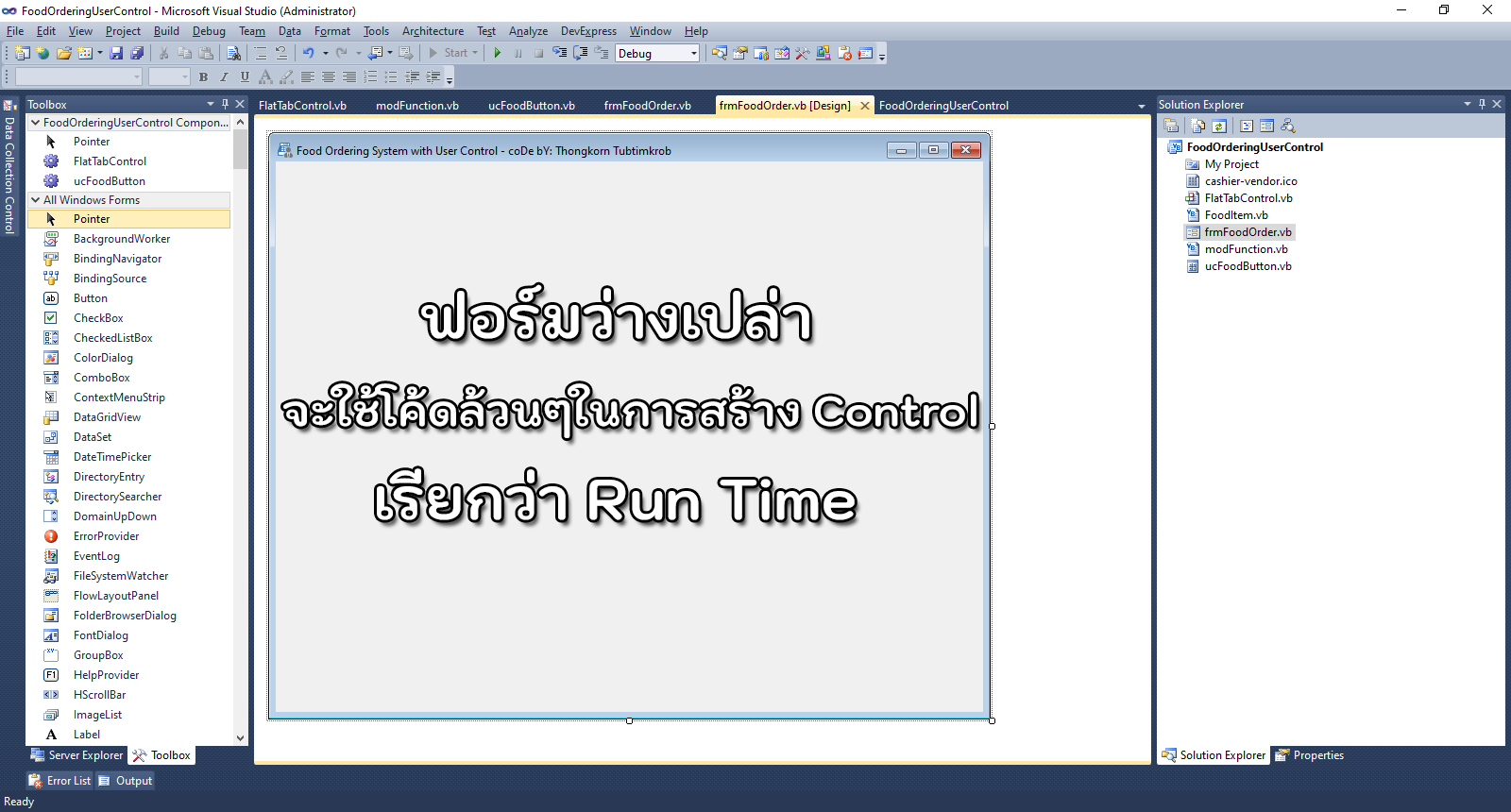
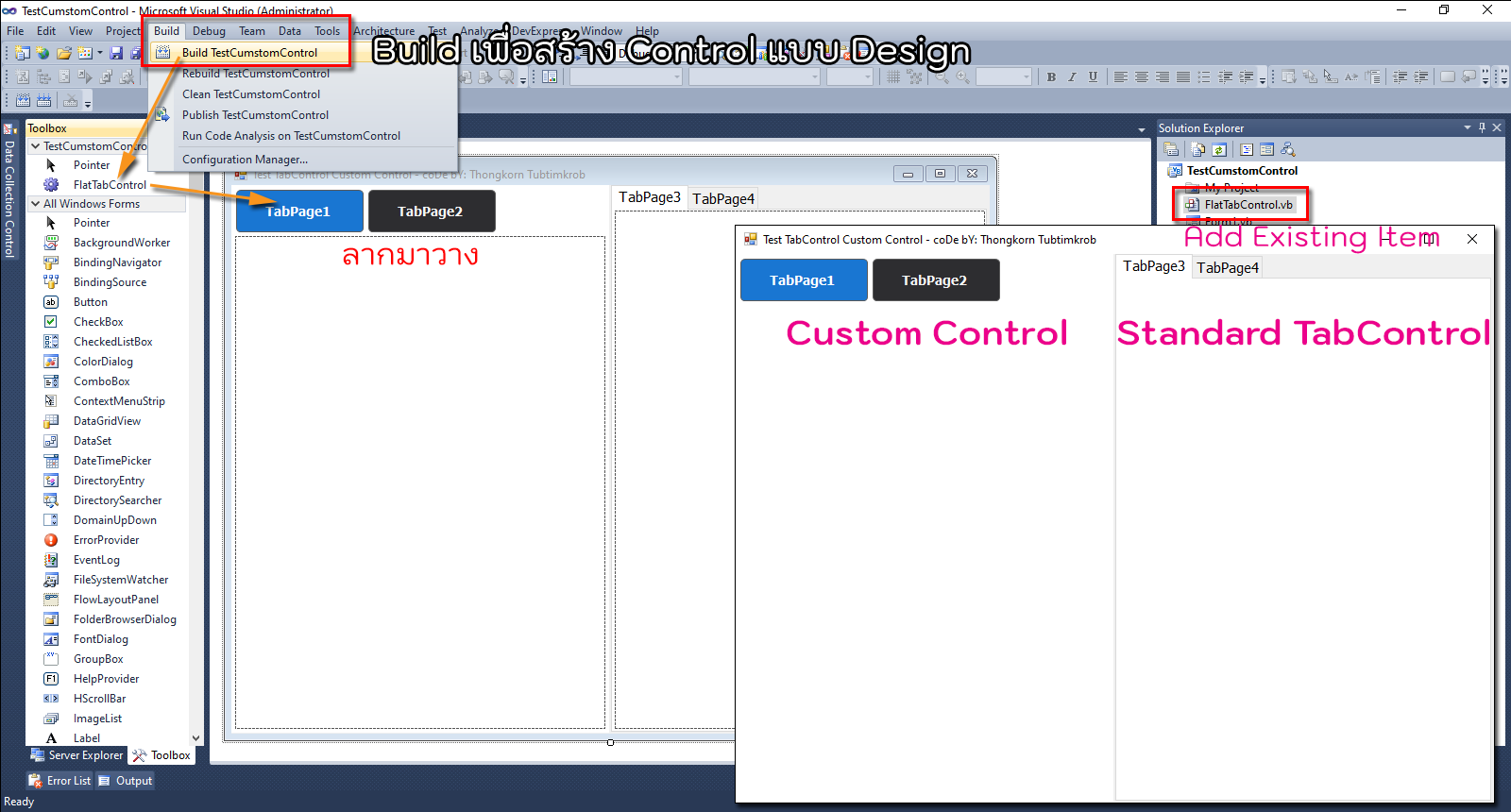
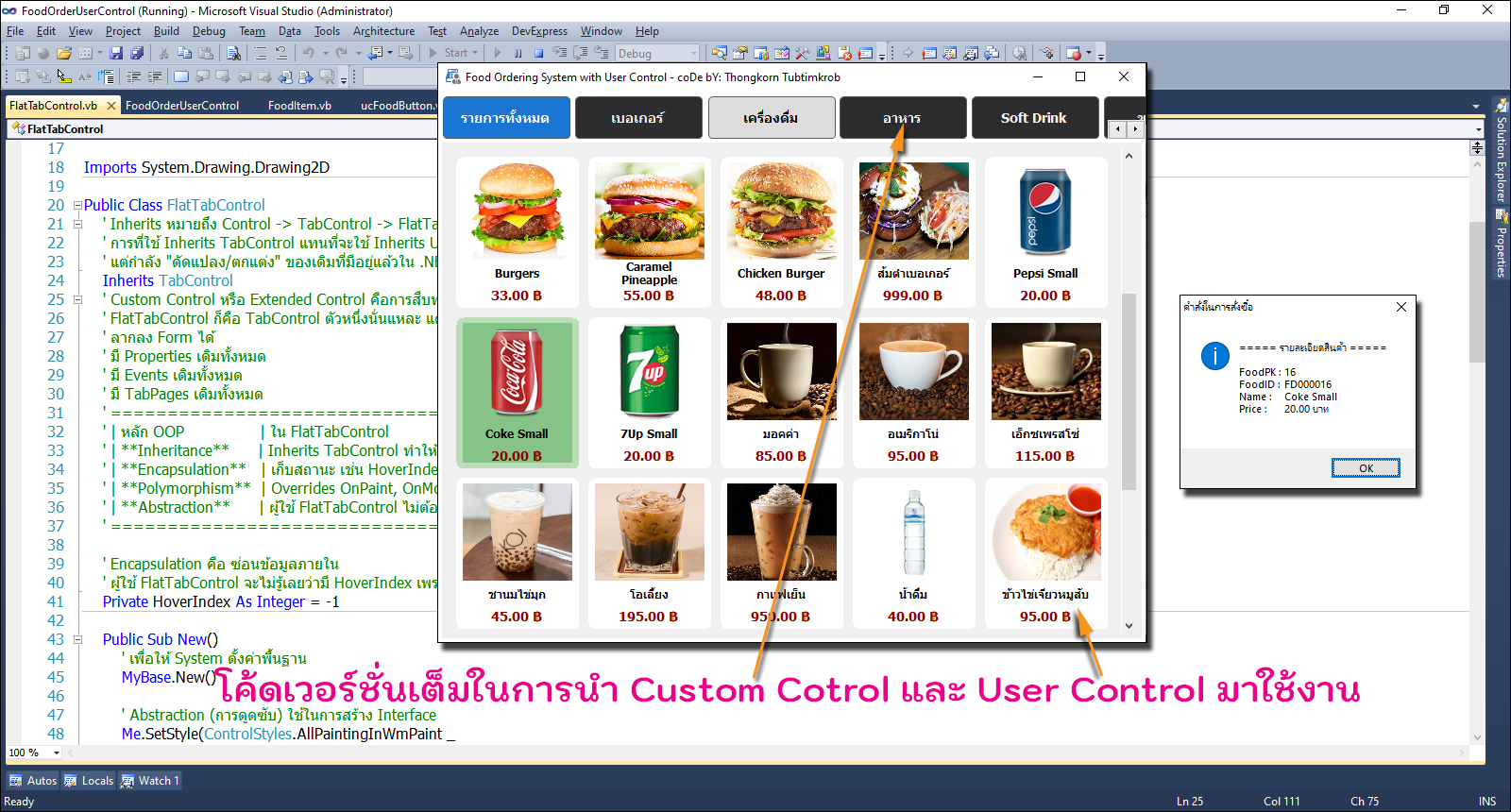
การสร้าง User Control และ Custom Control โปรเจคการสั่งซื้ออาหารเครื่องดื่ม บนจอแบบทัชสกรีน ...
ครั้งที่แล้วได้แจกโค้ดที่นำหลักการ OOP (Object Oriented Programming) มาอธิบาย กับการใช้ Inherits TabControl หมายถึง Control ที่เราสร้างขึ้นมาใหม่ (FlatTabControl) จะได้รับคุณสมบัติ และพฤติกรรมทั้งหมดของ TabControl มาตรฐานของไมโครซอฟท์มาตั้งต้น แล้วเราก็สามารถ "โมดิฟาย" หรือ "Override" พฤติกรรมบางส่วนได้ด้วย เราจึงเรียก Control ใหม่นี้ว่า Custom Control หรือ Extended Control ...
Custom Control & User Control ...
1. FlatTabControl เป็น Custom Control เพราะสืบทอดมาจาก TabControl (Inherits TabControl) แล้ว Override การวาด (OnPaint) และเพิ่มพฤติกรรมของตัวเอง
2. ucFoodButton เป็น User Control คือการรวม Control หลายๆตัวเข้ามาประกอบร่างกันเพื่อสร้าง Control ขึ้นมาใหม่อีกตัว เพราะภายในประกอบด้วย PictureBox, Label, Panel หลายๆตัวรวมกันเป็นปุ่มสินค้า สาเหตุหลักๆที่ต้องสร้าง User Control ขึ้นมาใหม่ ก็คือ Control ที่มีอยู่ใช้งาน ยังไม่ตอบโจทย์ให้กับตัวเรานั่นเอง
อธิบายการทำงานของ Class FoodItem (แบบคร่าวๆล่ะกัน)
1. Class FoodItem เปรียบเสมือน "แบบฟอร์มเปล่า" หรือ "พิมพ์เขียว"
มันยังไม่เก็บข้อมูลอะไรเลย มันแค่บอกว่า "ถ้าจะมีสินค้าหนึ่งชิ้น มันจะต้องมีช่องให้กรอกอะไรบ้าง" เช่น ช่องรหัส (FoodID), ช่องชื่อ (FoodName), ช่องราคา (PriceCash)
Public Class FoodItem
Public Property FoodPK As Integer ' ช่องที่ 1: เก็บตัวเลข
Public Property FoodID As String ' ช่องที่ 2: เก็บข้อความ
' ... (อื่นๆ)
End Class
2. การเก็บข้อมูล (การสร้าง Object)
แบบฟอร์มเปล่าจะเก็บข้อมูลได้ ก็ต่อเมื่อเรา "พิมพ์ข้อมูลลงไป" หรือในภาษาโปรแกรมเรียกว่าการสร้าง Instance (Object) โดยใช้คำสั่ง New
' การสั่งให้คอมพิวเตอร์จองพื้นที่ในหน่วยความจำเพื่อสร้าง "สินค้า 1 ชิ้น"
Dim myBurger As New FoodItem()
' การกรอกข้อมูลลงในช่องต่างๆ ของสินค้านั้น
myBurger.FoodPK = 1
myBurger.FoodName = "Classic Chicken"
myBurger.PriceCash = 45.00D
- ' Class FoodItem เป็น BluePrint หรือแม่แบบสำหรับสร้างวัตถุ (Object) ที่ใช้เก็บข้อมูลสินค้าแต่ละรายการ โดยมี Property ต่างๆ ดังนี้:
- Public Class FoodItem
- Public Property FoodPK As Integer
- Public Property FoodID As String
- Public Property FoodName As String
- Public Property PriceCash As Decimal
- Public Property CategoryFK As Integer
- Public Property PictureFood As String
- End Class
การใช้ FoodItem แบบนี้ แทนที่จะส่งข้อมูลทีละตัว เช่น FoodPK, FoodName, PriceCash แต่เราส่งเป็น FoodItem เพียงตัวเดียว ทำให้โค้ดอ่านง่าย ขยายความสามารถในอนาคตได้สะดวก (เช่น เพิ่ม Discount, VatRate, Barcode, StockQty ก็ไม่ต้องเปลี่ยนเมธอดทุกตัว) และยังสอดคล้องกับหลัก OOP เรื่อง Encapsulation คือการรวมข้อมูลที่เกี่ยวข้องไว้ในอ็อบเจ็กต์เดียว
มาดูโค้ดต้นฉบับในฟอร์มหลัก (frmFoodOrder.vb)
- Imports System.Data
- Imports System.Drawing
- Imports System.IO
- ' ==========================================================
- ' ฟอร์มหลักสำหรับสั่งอาหาร
- ' จัดการโหลดข้อมูลและภาพทั้งหมดที่นี่
- ' รองรับ VB.NET 2010 / .NET Framework 4.0
- ' ==========================================================
- Public Class frmFoodOrder
- ' ตัวแปรเก็บข้อมูล
- Private dtCategories As New DataTable()
- Private dtFoods As New DataTable()
- ' ประกาศคอนโทรลแท็บแบบกำหนดเอง
- Dim FlatTabControl1 As New FlatTabControl()
- ' ตัวแปรเก็บ Path โฟลเดอร์ภาพ เพื่อไม่ต้องเรียกซ้ำๆ
- Private imgRootPath As String = ""
- Private Sub frmFoodOrder_Load(sender As Object, e As EventArgs) Handles MyBase.Load
- ' เตรียมตำแหน่งโฟลเดอร์รูปภาพไว้ก่อน (My Project\Images)
- imgRootPath = Path.Combine(MyPath(Application.StartupPath), "Images")
- ' ตั้งค่าคอนโทรลแท็บ
- With FlatTabControl1
- .Cursor = Cursors.Hand
- .Dock = DockStyle.Fill
- .DrawMode = TabDrawMode.OwnerDrawFixed
- .Font = New Font("Tahoma", 10.0!, FontStyle.Bold)
- .ItemSize = New Size(140, 50)
- .Location = New Point(0, 0)
- .Name = "FlatTabControl1"
- .SelectedIndex = 0
- .Size = New Size(749, 583)
- .SizeMode = TabSizeMode.Fixed
- .TabIndex = 0
- .BackColor = Color.FromArgb(240, 240, 240)
- End With
- Me.Controls.Add(FlatTabControl1)
- ' โหลดข้อมูลตัวอย่าง (DataTable)
- LoadSampleData()
- ' การสร้างแท็บตามหมวดหมู่อาหาร/เครื่องดื่ม
- CreateDynamicTabs()
- End Sub
- ' โหลดข้อมูลตัวอย่างลง DataTable เพื่อดัดแปลงนำไปใช้กับระบบฐานข้อมูลได้เลยทันที
- Private Sub LoadSampleData()
- Dim culture As System.Globalization.CultureInfo = System.Globalization.CultureInfo.InvariantCulture
- ' โครงสร้างและข้อมูลหมวดหมู่
- With dtCategories.Columns
- .Add("CategoryPK", GetType(Integer))
- .Add("CategoryName", GetType(String))
- End With
- With dtCategories.Rows
- .Add(1, "รายการทั้งหมด")
- .Add(2, "เบอเกอร์")
- .Add(3, "เครื่องดื่ม")
- .Add(4, "อาหาร")
- .Add(5, "Soft Drink")
- .Add(6, "ของหวาน")
- End With
- ' โครงสร้างและข้อมูลรายการอาหาร
- With dtFoods.Columns
- .Add("FoodPK", GetType(Integer))
- .Add("FoodID", GetType(String))
- .Add("FoodName", GetType(String))
- .Add("PriceCash", GetType(Decimal))
- .Add("CategoryFK", GetType(Integer))
- .Add("PictureFood", GetType(String))
- End With
- ' ตัวอย่างรายการอาหาร/เครื่องดื่ม
- With dtFoods.Rows
- ' ไลเรียงฟิลด์ข้อมูลจาก Database (เพื่อนำไปใช้ในการออกแบบตารางข้อมูล)
- ' FoodPK, FoodID, FoodName, PriceCash, CategoryFK, PictureFood
- .Add(1, "FD000001", "Classic Checken", Decimal.Parse("45.00", culture), 2, "BurgerChicken.png")
- .Add(2, "FD000002", "Mexicana", Decimal.Parse("85.00", culture), 2, "BurgerMexicana.png")
- .Add(3, "FD000003", "Lemon Shrimp", Decimal.Parse("110.00", culture), 2, "BurgerLemonShrimp.png")
- .Add(4, "FD000004", "Bacon", Decimal.Parse("90.00", culture), 2, "BurgerBacon.png")
- .Add(5, "FD000005", "Spicy Shrimp", Decimal.Parse("120.00", culture), 2, "BurgerSpicyShrimp.png")
- .Add(6, "FD000006", "Tex Supreme", Decimal.Parse("80.00", culture), 2, "BurgerTexSupreme.png")
- .Add(7, "FD000007", "Fish", Decimal.Parse("100.00", culture), 2, "BurgerFish.png")
- .Add(8, "FD00008", "Special Meatballs", Decimal.Parse("65.00", culture), 2, "Burger1.png")
- .Add(9, "FD00009", "Grilled Burgers", Decimal.Parse("45.50", culture), 2, "Burger2.png")
- .Add(10, "FD000010", "Normal Burgers", Decimal.Parse("25.90", culture), 2, "Burger3.png")
- .Add(11, "FD000011", "Burgers", Decimal.Parse("33.00", culture), 2, "Burger4.png")
- .Add(12, "FD000012", "Caramel Pineapple", Decimal.Parse("55.00", culture), 2, "Burger5.png")
- .Add(13, "FD000013", "Chicken Burger", Decimal.Parse("48.00", culture), 2, "Burger6.png")
- .Add(14, "FD000014", "ส้มตำเบอเกอร์", Decimal.Parse("999.00", culture), 2, "SomtumBurger.png")
- .Add(15, "FD000015", "Pepsi Small", Decimal.Parse("20.00", culture), 3, "PepsiCan.png")
- .Add(16, "FD000016", "Coke Small", Decimal.Parse("20.00", culture), 3, "CocaColaCan.png")
- .Add(17, "FD000017", "7Up Small", Decimal.Parse("20.00", culture), 3, "7UpCan.png")
- .Add(18, "FD000018", "มอคค่า", Decimal.Parse("85.00", culture), 3, "Coffee5.png")
- .Add(19, "FD000019", "อเมริกาโน่", Decimal.Parse("95.00", culture), 3, "Coffee2.png")
- .Add(20, "FD000020", "เอ็กซเพรสโซ่", Decimal.Parse("115.00", culture), 3, "Coffee7.png")
- .Add(21, "FD000021", "ชานมไข่มุก", Decimal.Parse("45.00", culture), 3, "Tea1.png")
- .Add(22, "FD000022", "โอเลี้ยง", Decimal.Parse("195.00", culture), 3, "Coffee4.png")
- .Add(23, "FD000023", "กาแฟเย็น", Decimal.Parse("950.00", culture), 3, "Coffee6.png")
- .Add(24, "FD000024", "น้ำดื่ม", Decimal.Parse("40.00", culture), 3, "Water.jpg")
- .Add(25, "FD000025", "ข้าวไข่เจียวหมูสับ", Decimal.Parse("95.00", culture), 4, "RiceOmelet.jpg")
- .Add(26, "FD000026", "ข้าวผัดหมู", Decimal.Parse("150.00", culture), 4, "1.jpg")
- .Add(27, "FD000027", "ข้าวกะเพราหมูสับ ไข่ดาวสุกๆ", Decimal.Parse("1200.00", culture), 4, "2.jpg")
- .Add(28, "FD000028", "เหล้าเป็ก", Decimal.Parse("99.00", culture), 5, "Pek.png")
- .Add(29, "FD000029", "ทับทิมกรอบ", Decimal.Parse("250.00", culture), 6, "Tubtimkrob.png")
- .Add(30, "FD000030", "ขนมชั้น", Decimal.Parse("120.00", culture), 6, "Kanomchun.png")
- .Add(31, "FD000031", "ลอดช่องน้ำกะทิ", Decimal.Parse("150.00", culture), 6, "LodChong.png")
- End With
- End Sub
- ' สร้างแท็บและปุ่มรายการอาหารแบบไดนามิก
- Private Sub CreateDynamicTabs()
- FlatTabControl1.TabPages.Clear()
- ' วนสร้างแท็บตามหมวดหมู่
- For Each drCat As DataRow In dtCategories.Rows
- Dim tabPage As New TabPage(drCat("CategoryName").ToString())
- tabPage.Padding = New Padding(5)
- tabPage.BackColor = Color.FromArgb(240, 240, 240)
- tabPage.ForeColor = Color.Black
- ' พื้นที่แสดงรายการแบบเลื่อนได้
- Dim flowPanel As New FlowLayoutPanel()
- With flowPanel
- .Dock = DockStyle.Fill
- .AutoScroll = True
- .WrapContents = True
- .FlowDirection = FlowDirection.LeftToRight
- .Padding = New Padding(5)
- .BackColor = Color.FromArgb(240, 240, 240)
- End With
- ' กรองรายการอาหารตามหมวดหมู่
- Dim filterRows As DataRow()
- If CInt(drCat("CategoryPK")) = 1 Then
- filterRows = dtFoods.Select()
- Else
- filterRows = dtFoods.Select("CategoryFK = " & drCat("CategoryPK").ToString())
- End If
- ' สร้างปุ่มรายการอาหาร
- ' สร้าง Object FoodItem ชั่วคราวเพื่อส่งให้ ucFoodButton (Class FooItem อยู่ที่ไฟล์ FoodItem.vb)
- ' การใช้ FoodItem แบบนี้ แทนที่จะส่งข้อมูลทีละตัว เช่น FoodPK, FoodName, PriceCash แต่เราส่งเป็น FoodItem เพียงตัวเดียว
- ' ทำให้โค้ดอ่านง่าย ขยายความสามารถในอนาคตได้สะดวก (เช่น เพิ่ม Discount, VatRate, Barcode, StockQty ก็ไม่ต้องเปลี่ยนเมธอดทุกตัว)
- ' และยังสอดคล้องกับหลัก OOP เรื่อง Encapsulation คือการรวมข้อมูลที่เกี่ยวข้องไว้ในอ็อบเจ็กต์เดียว
- For Each drFood As DataRow In filterRows
- ' 1. สร้าง Object ข้อมูลสินค้า
- Dim tempFood As New FoodItem() With {
- .FoodPK = CInt(drFood("FoodPK")),
- .FoodID = drFood("FoodID").ToString(),
- .FoodName = drFood("FoodName").ToString(),
- .PriceCash = CDec(drFood("PriceCash")),
- .CategoryFK = CInt(drFood("CategoryFK")),
- .PictureFood = drFood("PictureFood").ToString()
- }
- ' 2. โหลดรูปภาพที่ฟอร์มหลัก (จัดการทั้งหมดที่นี่)
- Dim btnImage As Image = Nothing
- Dim targetImgPath As String = Path.Combine(imgRootPath, tempFood.PictureFood)
- Dim defaultImgPath As String = Path.Combine(imgRootPath, "BurgerBW.png")
- ' ภาพอาหาร/เครื่องดื่ม
- If File.Exists(targetImgPath) Then
- Using bmp As New Bitmap(targetImgPath)
- btnImage = New Bitmap(bmp)
- End Using
- ' หากไม่พบชื่อไฟล์ภาพ ให้ใช้ภาพ BurgerBW.png แสดงผลแทน
- ElseIf File.Exists(defaultImgPath) Then
- Using bmp As New Bitmap(defaultImgPath)
- btnImage = New Bitmap(bmp)
- End Using
- ' หากไม่มีไฟล์ภาพ BurgerBW.png ก็ไม่ต้องแสดงผลภาพประกอบ
- Else
- btnImage = Nothing
- End If
- ' 3. ส่งทั้งข้อมูลและภาพไปให้ปุ่ม (User Control ชื่อไฟล์ ucFoodButton.vb)
- Dim uc As New ucFoodButton()
- uc.SetData(tempFood, btnImage) ' Method SetData อยู่ที่ ucFoodButton.vb
- uc.Margin = New Padding(5)
- flowPanel.Controls.Add(uc)
- Next
- '
- tabPage.Controls.Add(flowPanel)
- FlatTabControl1.TabPages.Add(tabPage)
- Next
- End Sub
- ' ปิดโปรแกรมและล้างหน่วยความจำ
- Private Sub frmFoodOrder_FormClosed(sender As Object, e As FormClosedEventArgs) Handles MyBase.FormClosed
- Me.Dispose()
- GC.SuppressFinalize(Me)
- Application.Exit()
- End Sub
- End Class
โค้ดในสร้างปุ่มคำสั่งแบบ User Control (ucFoodButton.vb)
- Imports System.Drawing
- Imports System.Drawing.Drawing2D
- Public Class ucFoodButton
- ' ตัวแปรเก็บข้อมูลสินค้า (Class FooItem อยู่ที่ไฟล์ FoodItem.vb)
- Private _currentFood As FoodItem
- ' สีสำหรับการแสดงผลสถานะต่างๆ สำหรับปุ่มคำสั่ง
- Private ReadOnly _defaultColor As Color = Color.White
- Private ReadOnly _hoverColor As Color = Color.FromArgb(70, Color.Green)
- Private ReadOnly _pressColor As Color = Color.FromArgb(120, Color.Orange)
- ' ประกาศคอนโทรลภายใน
- Private pnlContainer As Panel
- Private table As TableLayoutPanel
- Private picFood As PictureBox
- Private lblName As Label
- Private lblPrice As Label
- Public Sub New()
- InitializeComponent()
- ' การตั้งค่าเริ่มต้นของ User Control
- Me.SetStyle(ControlStyles.ResizeRedraw, True)
- Me.Size = New Size(130, 160) ' ขนาดของปุ่มคำสั่ง
- Me.Cursor = Cursors.Hand
- Me.BackColor = _defaultColor
- ' สร้างโครงสร้างคอนโทรลภายใน
- BuildControl()
- End Sub
- ' ปรับขอบโค้งเมื่อมีการปรับขนาด
- Protected Overrides Sub OnResize(ByVal e As EventArgs)
- MyBase.OnResize(e)
- MakeRounded()
- End Sub
- ' --- ส่วนของการวาดมุมโค้ง (Rounded Rectangle) ---
- Private Sub MakeRounded()
- Dim radius As Integer = 15 ' รัศมีของความโค้ง
- Dim path As New GraphicsPath()
- path.AddArc(0, 0, radius, radius, 180, 90)
- path.AddArc(Me.Width - radius, 0, radius, radius, 270, 90)
- path.AddArc(Me.Width - radius, Me.Height - radius, radius, radius, 0, 90)
- path.AddArc(0, Me.Height - radius, radius, radius, 90, 90)
- path.CloseFigure()
- Me.Region = New Region(path)
- End Sub
- ' สร้างโครงสร้างปุ่ม
- Private Sub BuildControl()
- Me.Controls.Clear()
- ' Panel หลัก
- pnlContainer = New Panel()
- With pnlContainer
- .Dock = DockStyle.Fill
- .Padding = New Padding(5)
- .BackColor = Color.White
- End With
- ' ตารางจัดวางของ TableLauoutPanel
- table = New TableLayoutPanel()
- With table
- .Dock = DockStyle.Fill
- .ColumnCount = 1 ' กำหนด 1 หลัก
- .RowCount = 3 ' กำหนด 3 แถว (แถวแรกใส่ PictureBox, แถวที่ 2 ใส่ Label ชื่ออาหาร/เครื่องดื่ม, แถวที่ 3 ใส่ Label ราคา)
- .ColumnStyles.Add(New ColumnStyle(SizeType.Percent, 100)) ' Size แบบ Percent ทั้ง Column และ Row
- .RowStyles.Add(New RowStyle(SizeType.Percent, 70))
- .RowStyles.Add(New RowStyle(SizeType.Percent, 20))
- .RowStyles.Add(New RowStyle(SizeType.Percent, 10))
- End With
- ' ส่วนแสดงรูปภาพ
- picFood = New PictureBox()
- With picFood
- .Dock = DockStyle.Fill
- .SizeMode = PictureBoxSizeMode.StretchImage
- .Margin = New Padding(0)
- .BackColor = Color.White
- End With
- ' ส่วนแสดงชื่อ
- lblName = New Label()
- With lblName
- .Dock = DockStyle.Fill
- .Font = New Font("Tahoma", 9, FontStyle.Bold)
- .TextAlign = ContentAlignment.MiddleCenter
- .AutoEllipsis = True
- .MaximumSize = New Size(0, 36)
- .Margin = New Padding(0)
- End With
- ' ส่วนแสดงราคา
- lblPrice = New Label()
- With lblPrice
- .Dock = DockStyle.Fill
- .Font = New Font("Tahoma", 10, FontStyle.Bold)
- .ForeColor = Color.DarkRed
- .TextAlign = ContentAlignment.MiddleCenter
- .Margin = New Padding(0)
- End With
- '// ตำแหน่งการวาง Control ใน TableLayoutPanel (table) เพื่อสร้างปุ่มคำสั่ง
- '+---------------------------+
- '| |
- '| PictureBox |
- '| (StretchImage) |
- '| |
- '+---------------------------+
- '| Classic Checker |
- '| |
- '+---------------------------+
- '| 69.00 ฿ |
- '+---------------------------+
- ' จัดวางคอนโทรล
- table.Controls.Add(picFood, 0, 0)
- table.Controls.Add(lblName, 0, 1)
- table.Controls.Add(lblPrice, 0, 2)
- ' วาง TableLayoutPanel เอาไวใน Panel
- pnlContainer.Controls.Add(table)
- ' เอา Panel ไปวางไว้ในฟอร์ม
- Me.Controls.Add(pnlContainer)
- ' ผูกเหตุการณ์เมาส์ (Add Event Handler)
- RegisterEvents(Me)
- RegisterEvents(pnlContainer)
- RegisterEvents(table)
- RegisterEvents(picFood)
- RegisterEvents(lblName)
- RegisterEvents(lblPrice)
- End Sub
- ' ผูกเหตุการณ์เมาส์ให้กับคอนโทรลทั้งหมด
- Private Sub RegisterEvents(ctrl As Control)
- AddHandler ctrl.MouseEnter, AddressOf Control_MouseEnter
- AddHandler ctrl.MouseLeave, AddressOf Control_MouseLeave
- AddHandler ctrl.MouseDown, AddressOf Control_MouseDown
- AddHandler ctrl.MouseUp, AddressOf Control_MouseUp
- AddHandler ctrl.Click, AddressOf Control_Click
- End Sub
- ' เปลี่ยนสีเมื่อเมาส์ชี้
- Private Sub Control_MouseEnter(sender As Object, e As EventArgs)
- SetHighlight(_hoverColor)
- End Sub
- ' คืนสีเดิมเมื่อเมาส์ออก
- Private Sub Control_MouseLeave(sender As Object, e As EventArgs)
- SetHighlight(_defaultColor)
- End Sub
- ' เปลี่ยนสีเมื่อกดเมาส์
- Private Sub Control_MouseDown(sender As Object, e As MouseEventArgs)
- SetHighlight(_pressColor)
- End Sub
- ' เปลี่ยนสีเมื่อปล่อยเมาส์
- Private Sub Control_MouseUp(sender As Object, e As MouseEventArgs)
- SetHighlight(_hoverColor)
- End Sub
- ' ตั้งค่าสีพื้นหลัง
- Private Sub SetHighlight(ByVal clr As Color)
- pnlContainer.BackColor = clr
- table.BackColor = clr
- lblName.BackColor = Color.Transparent
- lblPrice.BackColor = Color.Transparent
- picFood.BackColor = Color.Transparent
- End Sub
- ' เมื่อมีการกดปุ่มคำสั่ง Button เพื่อแสดงรายการอาหาร/เครื่องดื่ม
- ' ส่วนนี้จะถูกส่งต่อไปแสดงผลยังตารางกริด เพื่อแจ้งยอดการสั่งซื้อ
- Private Sub Control_Click(sender As Object, e As EventArgs)
- If _currentFood IsNot Nothing Then
- ' แสดง MessageBox เมื่อ {0} = vbCrLf หรือ NewLine
- Dim msg As String = String.Format(
- "===== รายละเอียดสินค้า ====={0}{0}" & _
- "FoodPK : {1}{0}" & _
- "FoodID : " & vbTab & "{2}{0}" & _
- "Name : " & vbTab & "{3}{0}" & _
- "Price : " & vbTab & "{4:0.00} บาท{0}{0}",
- Environment.NewLine,
- _currentFood.FoodPK,
- _currentFood.FoodID,
- _currentFood.FoodName,
- _currentFood.PriceCash)
- MessageBox.Show(msg, "คำสั่งในการสั่งซื้อ", MessageBoxButtons.OK, MessageBoxIcon.Information)
- End If
- End Sub
- ' ==========================================================
- ' เมธอดรับข้อมูลและภาพจากภายนอก (ฟอร์มหลัก)
- ' รับแค่ข้อมูลที่ต้องแสดง ไม่ต้องไปค้นหาไฟล์เอง
- ' ==========================================================
- Public Sub SetData(food As FoodItem, foodImage As Image)
- _currentFood = food
- lblName.Text = food.FoodName
- lblPrice.Text = food.PriceCash.ToString("N2") & " ฿"
- ' กำหนดภาพที่ส่งมาจากฟอร์มหลักโดยตรง
- picFood.Image = foodImage
- End Sub
- End Class
โค้ดในการสร้าง Custom Control หรือ FlatTabControl ที่สืบทอดมาจาก TabControl มาตรฐาน (FlatTabControl.vb)
ดูรายละเอียดได้ที่นี่ ...
- Imports System.Drawing.Drawing2D
- Public Class FlatTabControl
- ' Inherits หมายถึง Control -> TabControl -> FlatTabControl
- ' การที่ใช้ Inherits TabControl แทนที่จะใช้ Inherits UserControl แปลว่า ไม่ได้สร้างของใหม่จากศูนย์
- ' แต่กำลัง "ดัดแปลง/ตกแต่ง" ของเดิมที่มีอยู่แล้วใน .NET Framework
- Inherits TabControl
- ' Custom Control หรือ Extended Control คือการสืบทอดจาก Control มาตรฐาน
- ' FlatTabControl ก็คือ TabControl ตัวหนึ่งนั่นแหละ แต่มีการเปลี่ยนแปลงคุณสมบัติ เช่น รูปร่าง สี ฯลฯ ให้เป็นไปตามที่เราต้องการ ดังนี้
- ' ลากลง Form ได้
- ' มี Properties เดิมทั้งหมด
- ' มี Events เดิมทั้งหมด
- ' มี TabPages เดิมทั้งหมด
- ' ==================================================================================
- ' | หลัก OOP | ใน FlatTabControl
- ' | **Inheritance** | Inherits TabControl ทำให้ใช้งานได้ทุกความสามารถของ TabControl มาใช้งานทันที (ไม่ต้องเขียนโค้ดใหม่)
- ' | **Encapsulation** | เก็บสถานะ เช่น HoverIndex เป็น Private และเปิดเผยเฉพาะสิ่งที่ผู้ใช้ Control ใช้งาน เช่น FlatTabControl1.SelectedIndex
- ' | **Polymorphism** | Overrides OnPaint, OnMouseMove, OnMouseLeave ใช้ชื่อ Method เดิม แต่เปลี่ยนพฤติกรรมเดิมของ TabControl
- ' | **Abstraction** | ผู้ใช้ FlatTabControl ไม่ต้องรู้รายละเอียดการวาดกราฟิกหรือการจัดการเมาส์ เพียงลาก Control ไปใช้เหมือน TabControl ปกติ
- ' ==================================================================================
- ' Encapsulation คือ ซ่อนข้อมูลภายใน
- ' ผู้ใช้ FlatTabControl จะไม่รู้เลยว่ามี HoverIndex เพราะมี Private ซ่อนเอาไว้
- Private HoverIndex As Integer = -1
- Public Sub New()
- ' เพื่อให้ System ตั้งค่าพื้นฐาน
- MyBase.New()
- ' Abstraction (การดูดซับ) ใช้ในการสร้าง Interface
- Me.SetStyle(ControlStyles.AllPaintingInWmPaint _
- Or ControlStyles.OptimizedDoubleBuffer _
- Or ControlStyles.ResizeRedraw _
- Or ControlStyles.UserPaint, True)
- Me.DrawMode = TabDrawMode.OwnerDrawFixed
- Me.SizeMode = TabSizeMode.Fixed
- Me.ItemSize = New Size(140, 50)
- Me.Font = New Font("Tahoma", 10, FontStyle.Bold)
- End Sub
- ' Overrides หมายถึงว่ามีของเดิมใน Tab Control อยู่แล้ว แต่ขอแก้ไขใหม่ (หรือเรียกของ Microsoft มาก่อน แล้วค่อยมาทำของเราอีกที)
- ' หรือกล่าวแบบสั้นๆ คือ การที่คลาสลูก เขียนทับพฤติกรรมของคลาสแม่
- Protected Overrides Sub OnMouseMove(e As MouseEventArgs)
- ' ระบบของ Microsoft อาจจะไม่ทำงาน เราจึงต้องสั่ง MyBase.OnMouseMove(e) ดักเอาไว้ก่อน
- MyBase.OnMouseMove(e)
- HoverIndex = -1
- For i As Integer = 0 To Me.TabPages.Count - 1
- If Me.GetTabRect(i).Contains(e.Location) Then
- HoverIndex = i
- Exit For
- End If
- Next
- Me.Invalidate()
- End Sub
- Protected Overrides Sub OnMouseLeave(e As EventArgs)
- MyBase.OnMouseLeave(e)
- HoverIndex = -1
- Me.Invalidate()
- End Sub
- ' Encapsulation (การห่อหุ้ม) แม้จะเป็น Custom Control แต่เรายังคงซ่อนรายละเอียดการวาดภาพที่ซับซ้อนไว้ภายในคลาส
- ' ตัวแปร HoverIndex, ฟังก์ชัน RoundRect, การคำนวณสีภายใน OnPaint ถูกห่อหุ้มไว้
- ' ผู้ใช้งานภายนอก (คนเอา Control ไปใช้) ไม่ต้องรู้ ว่ามันวาดยังไง
- ' เขาจะแค่เห็นว่า Control มี Property SelectedIndex หรือ TabPages ให้ใช้งานเหมือนเดิม
- Protected Overrides Sub OnPaint(e As PaintEventArgs)
- e.Graphics.Clear(Color.White)
- e.Graphics.SmoothingMode = SmoothingMode.AntiAlias
- '=========================
- ' วาดแท็บ
- '=========================
- For i As Integer = 0 To Me.TabPages.Count - 1
- Dim r As Rectangle = Me.GetTabRect(i)
- r.Inflate(-3, -3)
- Dim back As Color
- Dim fore As Color
- If i = Me.SelectedIndex Then
- back = Color.FromArgb(25, 118, 210)
- fore = Color.White
- ElseIf i = HoverIndex Then
- back = Color.Gainsboro
- fore = Color.Black
- Else
- back = Color.FromArgb(45, 45, 48)
- fore = Color.WhiteSmoke
- End If
- ' เมื่อออกจากบล็อก Using จะเรียก Dispose() ทันที (แม้จะเกิด Exception ก็ตาม)
- ' ถ้าสร้างทิ้งไว้ไม่ Dispose พอวน Loop หลายๆ รอบ (หรือเปิดปิด Tab บ่อยๆ) จะทำให้เกิด Memory Leak
- ' และอาจทำให้โปรแกรมค้างหรือแสดงผลผิดเพี้ยนได้
- Using gp As GraphicsPath = RoundRect(r, 8) ' <------ สร้าง GraphicsPath
- Using br As New SolidBrush(back) ' <------ สร้าง Brush (ซ้อนกัน)
- e.Graphics.FillPath(br, gp)
- End Using
- Using pn As New Pen(Color.FromArgb(90, 90, 90)) ' <------ สร้าง Pen
- e.Graphics.DrawPath(pn, gp)
- End Using
- End Using
- TextRenderer.DrawText( _
- e.Graphics, _
- Me.TabPages(i).Text, _
- Me.Font, _
- r, _
- fore, _
- TextFormatFlags.HorizontalCenter Or _
- TextFormatFlags.VerticalCenter)
- Next
- '=========================
- ' พื้นหลังของ Page
- '=========================
- Dim PageRect As Rectangle
- PageRect = Me.DisplayRectangle
- PageRect.Inflate(1, 1)
- Using br As New SolidBrush(Color.White)
- e.Graphics.FillRectangle(br, PageRect)
- End Using
- End Sub
- '=========================
- ' วาดเส้นโค้ง
- '=========================
- Private Function RoundRect(r As Rectangle, radius As Integer) As GraphicsPath
- Dim gp As New GraphicsPath
- gp.AddArc(r.Left, r.Top, radius, radius, 180, 90)
- gp.AddArc(r.Right - radius, r.Top, radius, radius, 270, 90)
- gp.AddArc(r.Right - radius, r.Bottom - radius, radius, radius, 0, 90)
- gp.AddArc(r.Left, r.Bottom - radius, radius, radius, 90, 90)
- gp.CloseFigure()
- Return gp
- End Function
- End Class
Class ในการจัดเก็บข้อมูลอาหารหรือเครื่องดื่ม (FoodItem.vb)
- ' Class FoodItem เป็น BluePrint หรือแม่แบบสำหรับสร้างวัตถุ (Object) ที่ใช้เก็บข้อมูลสินค้าแต่ละรายการ โดยมี Property ต่างๆ ดังนี้:
- Public Class FoodItem
- Public Property FoodPK As Integer
- Public Property FoodID As String
- Public Property FoodName As String
- Public Property PriceCash As Decimal
- Public Property CategoryFK As Integer
- Public Property PictureFood As String
- End Class
ฟังค์ชั่นเกี่ยวกับการกำหนดพาธ (modFunction.vb) - Module modFunction
- ' ==========================================================
- ' ฟังก์ชัน MyPath ตามที่กำหนด
- ' ==========================================================
- Public Function MyPath(ByVal AppPath As String) As String
- ' แทนที่ path ของ bin ต่างๆ ให้กลับไปที่ root folder ของโปรเจกต์
- Dim resultPath As String = AppPath.ToLower.Replace("\bin\debug", "") _
- .Replace("\bin\release", "") _
- .Replace("\bin\x86\debug", "")
- ' ถ้าไม่มี \ (BackSlash) ต่อท้าย ให้เติมเข้าไป
- If Not resultPath.EndsWith("") Then resultPath = resultPath & ""
- Return resultPath
- End Function
- End Module
ดาวน์โหลดโค้ดต้นฉบับ VB.NET (2010) & .Net Framework 4.0 ได้ที่นี่ ..
|
ขออภัย! โพสต์นี้มีไฟล์แนบหรือรูปภาพที่ไม่ได้รับอนุญาตให้คุณเข้าถึง
คุณจำเป็นต้อง ลงชื่อเข้าใช้ เพื่อดาวน์โหลดหรือดูไฟล์แนบนี้ คุณยังไม่มีบัญชีใช่ไหม? ลงทะเบียน
x
|




 โพสต์ 2026-7-28 15:20:04

